Improving Core Web Vitals: A Practical Guide
LCP, INP, and CLS explained clearly — with concrete actions that deliver measurable results right away. Includes a prioritized order of implementation.

Paul Mill
Web Design & Development

Table of contents
Pages ranking in position 1 on Google pass Core Web Vitals thresholds 10% more often than pages in position 9. That sounds small — until you consider that the difference between position 3 and position 8 can mean the difference between 200 and 20 leads per month for a small business.
Core Web Vitals are Google’s metrics for real-world user experience. Since the Core Update in March 2026, Google has been weighting performance signals more heavily than before. This guide covers the three metrics, their thresholds, and — most importantly — the actions with the highest impact.
The Three Metrics at a Glance
Core Web Vitals measure three aspects of user experience: loading speed (LCP), responsiveness (INP), and visual stability (CLS).
| Metric | What it measures | Good | Poor |
|---|---|---|---|
| LCP — Largest Contentful Paint | How quickly the largest visible content appears | ≤ 2.5 s | > 4.0 s |
| INP — Interaction to Next Paint | How quickly the page responds to clicks/taps | ≤ 200 ms | > 500 ms |
| CLS — Cumulative Layout Shift | How stable the layout remains while loading | ≤ 0.1 | > 0.25 |
Important: Google measures field data — real user experiences via the Chrome UX Report, not lab tests. Lighthouse scores are useful for debugging, but field data is what determines your ranking.
The Right Order: TTFB → LCP → INP → CLS
Before optimizing individual metrics: work in this order. TTFB (Time to First Byte) is the foundation — if the server responds slowly, no other optimization can compensate for it.
| Priority | Metric | Typical Lever |
|---|---|---|
| 1 | TTFB | Enable CDN, server-side caching |
| 2 | LCP | Optimize images, preload critical resources |
| 3 | INP | Reduce JavaScript, keep event handlers lean |
| 4 | CLS | Set dimensions, preload fonts |
And: optimize at the template level, not URL by URL. A fix in the base layout solves the problem on every page that uses that template.
Optimizing LCP: The Three Strongest Levers
The hero image is almost always the LCP candidate. Three actions that consistently save 1–2 seconds combined across my projects:
1. Image Format and Size
A 5 MB hero image that could work as a 200 KB WebP is the most common LCP killer. The fix:
<img
  src="/hero.webp"
  alt="Description"
  width="1200"
  height="630"
  fetchpriority="high"
  loading="eager"
/>- WebP/AVIF instead of PNG/JPG — 30–50% smaller at the same quality
fetchpriority="high"signals to the browser: this image takes priority- Explicit
width/height— prevents layout shifts and allows the browser to reserve space
2. Eliminating Render-Blocking Resources
Every CSS or JS file in the <head> without async or defer blocks rendering. Modern frameworks like Astro handle this automatically — for WordPress sites with 15+ plugins, it’s worth checking the Network tab.
Quick test: open Chrome DevTools → Network → filter by “Render-blocking”. Everything marked red there is delaying your LCP.
3. Bringing Server Response Time (TTFB) Under 200 ms
A CDN like Cloudflare can push TTFB below 50 ms — the simplest and most impactful lever for static websites. For WordPress sites: server-side caching (WP Super Cache, WP Rocket) delivers similar results.
Improving INP: The Problem Is JavaScript
INP is the most commonly failed Core Web Vital metric: 43% of all websites exceed the 200 ms threshold. The reason: too much JavaScript on the main thread.
Three actions that make the biggest difference:
Audit third-party scripts. Analytics, chat widgets, tag managers, and social media embeds are the usual suspects. In a recent project, removing an unused Intercom widget dropped INP from 380 ms to 120 ms — a single line of code.
Keep event handlers lean. Heavy computations have no place in click handlers. Offload compute-intensive work to requestIdleCallback or Web Workers.
content-visibility: auto on long pages. This CSS property tells the browser: only render what’s visible. On pages with 20+ sections, it can cut INP in half.
.section-below-fold {
  content-visibility: auto;
  contain-intrinsic-size: 0 500px;
}
Avoiding CLS: Usually Easy to Fix
CLS issues are the easiest to resolve — because the causes are almost always the same:
Images and videos without dimensions. The element loads, everything shifts. Fix: always set width and height in HTML. The browser reserves the space before the image arrives.
Web fonts without a fallback strategy. Text jumps when the custom font replaces the system font. Fix:
@font-face {
  font-family: "Inter";
  font-display: swap;
  src: url("/fonts/inter.woff2") format("woff2");
}
Even better: font-display: optional — the custom font is only shown if it loads in time. No jump, no flash.
Dynamically injected content. Cookie banners, sticky headers, and ad banners are classic CLS culprits. Reserve the space in advance with a fixed height, or use position: fixed / position: sticky to avoid disrupting the document flow.
Measuring: Two Tools Are Enough
To get started, you only need two tools:
- PageSpeed Insights — shows field data (real users) and lab data in a single report. The field data section at the top is what Google actually uses for rankings.
- Chrome DevTools → Performance — for frame-precise analysis of individual interactions. Essential for INP debugging.
Real-World Example
4× 100 in PageSpeed Insights
Here’s what the results of the actions in this article look like in practice — a current report from paulmill.com.
Static delivery via Cloudflare, optimized image formats, no render-blocking JavaScript, and explicit dimensions on all media elements.
- LCP 1.4 s
- CLS 0
- TBT 0 ms
- Speed Index 1.2 s
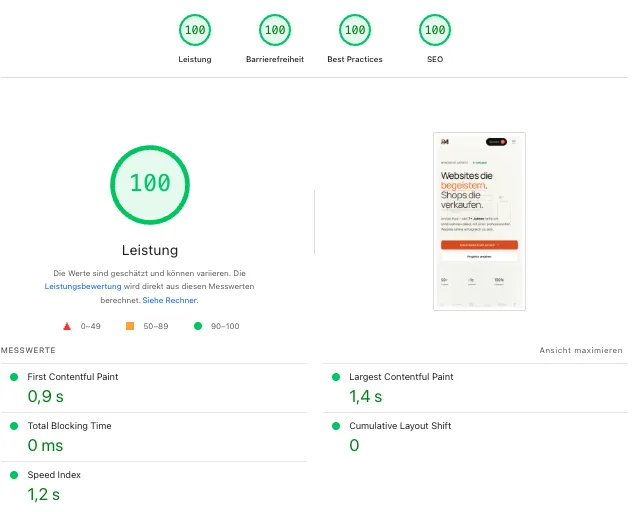
Optimize for real users, not Lighthouse scores. A score of 95 with poor field data does nothing for your ranking. Field data from the Chrome UX Report is more meaningful than any lab test.
Frequently Asked Questions About Core Web Vitals
Are good Core Web Vitals enough for a top ranking on their own?
No. Content relevance and domain authority carry more weight. Google’s John Mueller has confirmed this multiple times: “Relevance is still by far much more important.” But when content is comparable, Core Web Vitals determine whether you land at position 3 vs. position 8 — and that’s a massive difference in traffic.
How quickly do improvements take effect?
Field data in the Chrome UX Report is rolled over 28 days. After a fix, it takes 4–6 weeks before Google sees the improvement. Don’t panic if nothing changes after two weeks.
Do Core Web Vitals apply to desktop too?
Yes, but since 2024 Google primarily uses mobile field data as a ranking signal — including for desktop results. Optimize for mobile first.
The Bottom Line
Core Web Vitals are neither a mystery nor a full-time job. With the right image formats, lean JavaScript, and clean layout handling, green scores are achievable in most cases within a few hours.
The short formula: load fast (LCP ≤ 2.5 s), respond fast (INP ≤ 200 ms), don’t shift (CLS ≤ 0.1). If you want to know what a faster website could mean for your business, get in touch for a quick performance review.